
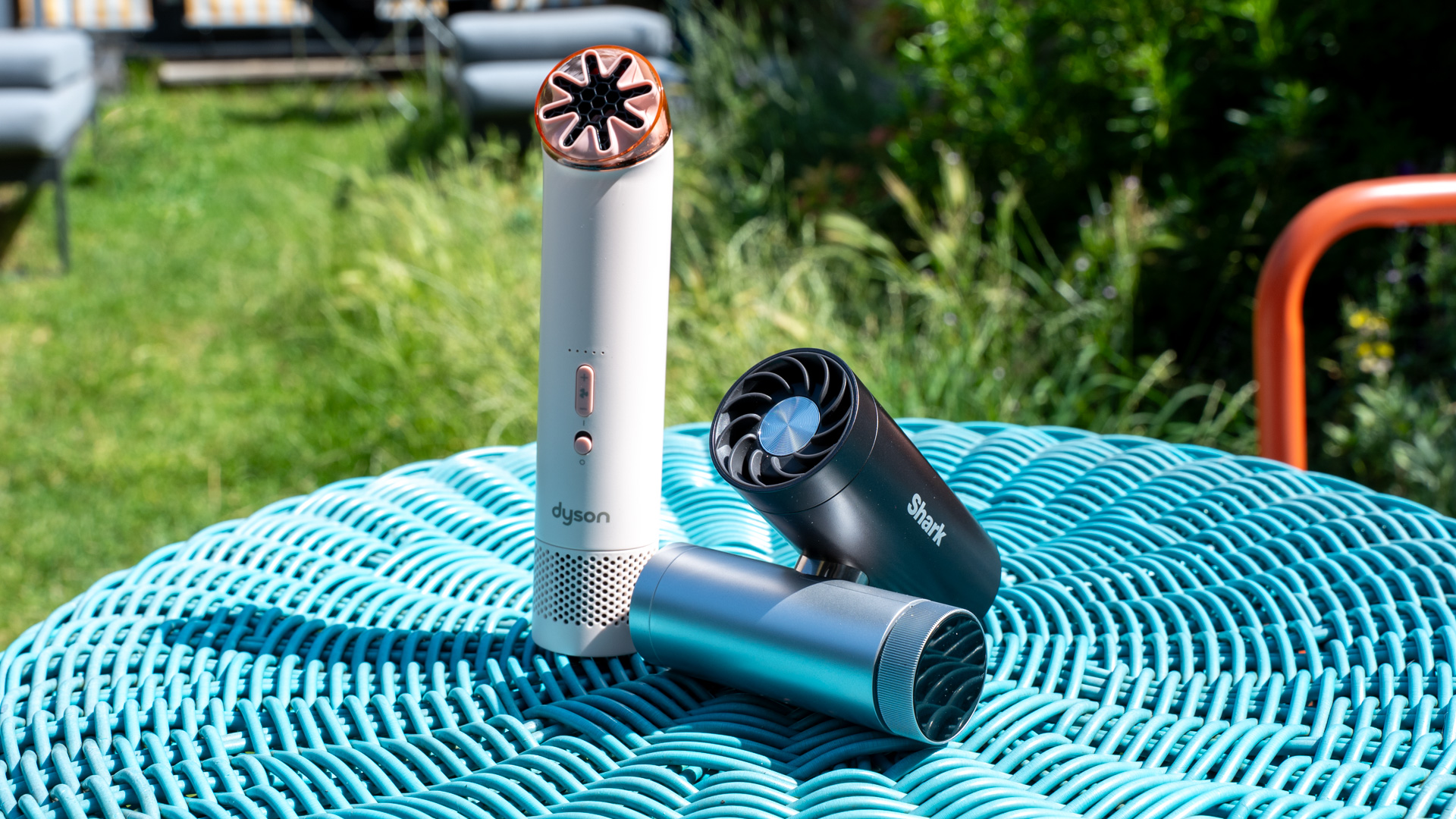
Forget those flimsy handheld budget fans you see everywhere; there are two better contenders to keep you cool on the go: the Shark ChillPill and the Dyson HushJet Mini Cool.
Both are high-quality, long-lasting personal fans, but both take a different approach to cooling. So, which one is the best? I break down the differences to help you make the right choice.
Price
If you saw the price of Dyson’s standard fans, you would think that the Dyson HushJet Mini Cool was a very expensive product. Surprisingly, it’s actually the cheaper of the two products, available at £99.99.
The Shark ChillPill costs £129.99, making it quite expensive. There are good reasons for the price difference, which I will go into throughout this article, but if you are shopping for price alone, the Dyson HushJet Mini Cool is a cheap product.
For Big Day 2026, Amazon has a special edition Shark ChillPill for £119.99, which includes a travel case.
Design and features
- Both have many color options
- Very different designs
Both fans are available in many colors to suit you. I won’t say that one is better than the other and, in both categories, you will find a color that you like best.
The real difference comes from how the fans are designed and what they come with.
Starting with the Dyson HushJet Mini Cool, this portable fan is a small stick, with a diameter of 38mm. At just 210g, it’s lighter than the ChillPill, too.

The ChillPill weighs 350g, so it’s far from heavy, but it’s also a bit chunkier (84 x 45 x 112mm) thanks to its double-barreled design. That design is one of ChillPill’s strengths.
One barrel contains the battery and controls, while the other holds the fan unit. If the hinge is in the middle, the two barrels can swing. This design gives you something solid to hold on to, and you can move the fan to point where you want, or you can put the fan down on the desk, and point the fan up.

A very flexible design that doesn’t need extras to get the airflow where you want it.
I found the Dyson HushJet Mini Cool light and easy to use in handheld mode, with top swivels to adjust airflow. If you want to use this fan in desktop mode, you really need to use the provided stand, which is provided in the box.

Dyson also provides a belt, so you can wear the fan and blow cool air as you move around.

The Shark has an optional sling strap, wrist strap and clip, but they are not in the box.
Like regular fans, both models have similar features. The Dyson has five selectable speeds, which can be selected with the up/down buttons on the front.

The Shark has 10 fan speeds to choose from, which can be selected by flipping the dial, and a neat LCD screen that shows the current selection, along with battery life. The number of fan speeds does not correlate with cooling performance, and I will come to that later.

Overall, Shark’s interface is slightly better than Dyson’s. One issue I had with the HushJet Mini Cool is that you don’t get a battery life indicator when the fan is on.
Shark wins with complete flexibility, as in the box you get two extra heads next to the fan. There is a Misting Pod, which uses water and blows a cool mist at you. If it’s not too humid, that can help you cool more than air flow alone.
There’s also the InstaChill Cooling Plate, which is a flat metal cooling plate, so you can place it on key areas (wrist, forehead and back of your neck) to help cool you down.

Having these accessories can add convenience, but the downside is that you have extra things to carry that won’t all fit in the bag.
Both fans are charged via USB-C. You can use the HushJet Mini Cool with one fan speed while charging; ChillPill only works with the fan attachment while charging, and you can use all 10 speeds, so it becomes a full desktop fan while standing.
Working
- We tested both to compare performance
- Dyson’s option is very powerful
I tested the fan performance of both using an anemometer to measure the wind speed from 15cm away. Of the two fans, the Dyson HushJet Mini Cool is the most powerful.
At the first fan speed, I got an air flow of 2.6m/s; medium speed, 5.5m/s; and 8.1m/s at the highest point. There is also a temporary Turbo mode (press and hold the up button) which increases the fan speed to a ridiculous 11.3m/s.
With the ChillPill, I couldn’t get the average fan speed, although I could feel a little wind; on setting 10, i measure 4m/s, which is a strong gust of wind.
This ChillPill has some of its accessories. With the Misting Pod, a little burst of water really makes a difference. Sitting on a hot beach, the fog ended the day and was better than the fresh air alone.

The downside is that it doesn’t last very long: up to five minutes in full or up to 10 minutes in short-term mode. Also, the necessary wires need to be changed every month.
That said, if you need something better than a single fan, the misting option is really useful, and you can always fill up on the go with bottled water.
The InstaChill Plate can be useful at times, although when it’s really hot, the fan or misting options are better in my opinion.
Both fans are quiet at low settings, but soon become louder as you increase the fan speed. I measured the HushJet Mini Cool at 78dB at peak, and the ChillPill at 67.9dB.
However, keep in mind that the HushJet Mini Cool is a very powerful fan; reduce the speed of its fans to match the size of the ChillPill and the two fans make the same amount of noise.
Battery life
- The shark wins here
- Both charge via USB-C
If you take the raw statistics from the fan modes, the Shark ChillPill has a long battery life: between 1.5 and 11 hours. The Dyson HushJet Mini Cool is rated for between one and six hours.
Also, I need to point out that the Dyson HushJet Mini Cool is very powerful at its peak. Turn the Dyson fan back to medium setting and you get the same output as the ChillPill at its medium setting, and battery life is the same at this point.
If you use the Misting Pod with the ChillPill, you will also lose battery life: between one and four hours, depending on battery life.
Shark ChillPill vs Dyson HushJet Mini Cool, which one is better?
Both fans are quality portable models that are a step above no-brand, cheap options. Which one is best depends on your needs. If you are looking for the smallest, lightest and most powerful fan, then buy the HushJet Mini Cool.
If you’re looking for something flexible with a range of attachments, including a Misting Pod, then the Shark ChillPill is the best option.
If you’re at home, read my guide to the best fans to find the perfect model for every room.
Full Details
| Shark ChillPill Review | Dyson HushJet Mini Cool Review | |
|---|---|---|
| The producer | A shark | Dyson |
| Size (Dimensions) | 84 x 45 x 112 MM | 38 x 38 x 180 MM |
| Weight | 350g | 210 g |
| Release date | 2026 | 2026 |
| Date of First Review | 10/03/2026 | 22/05/2026 |
| Model Number | Shark ChillPill | Dyson HushJet Mini Cool |
| Number of speeds | 10 | 5 |
| Kind of fans | Portable fan, mister and cooling pad | He’s holding it in his hand |
| Oscillation | No | – |
| Time | No | – |
| Heat mode | No | – |