
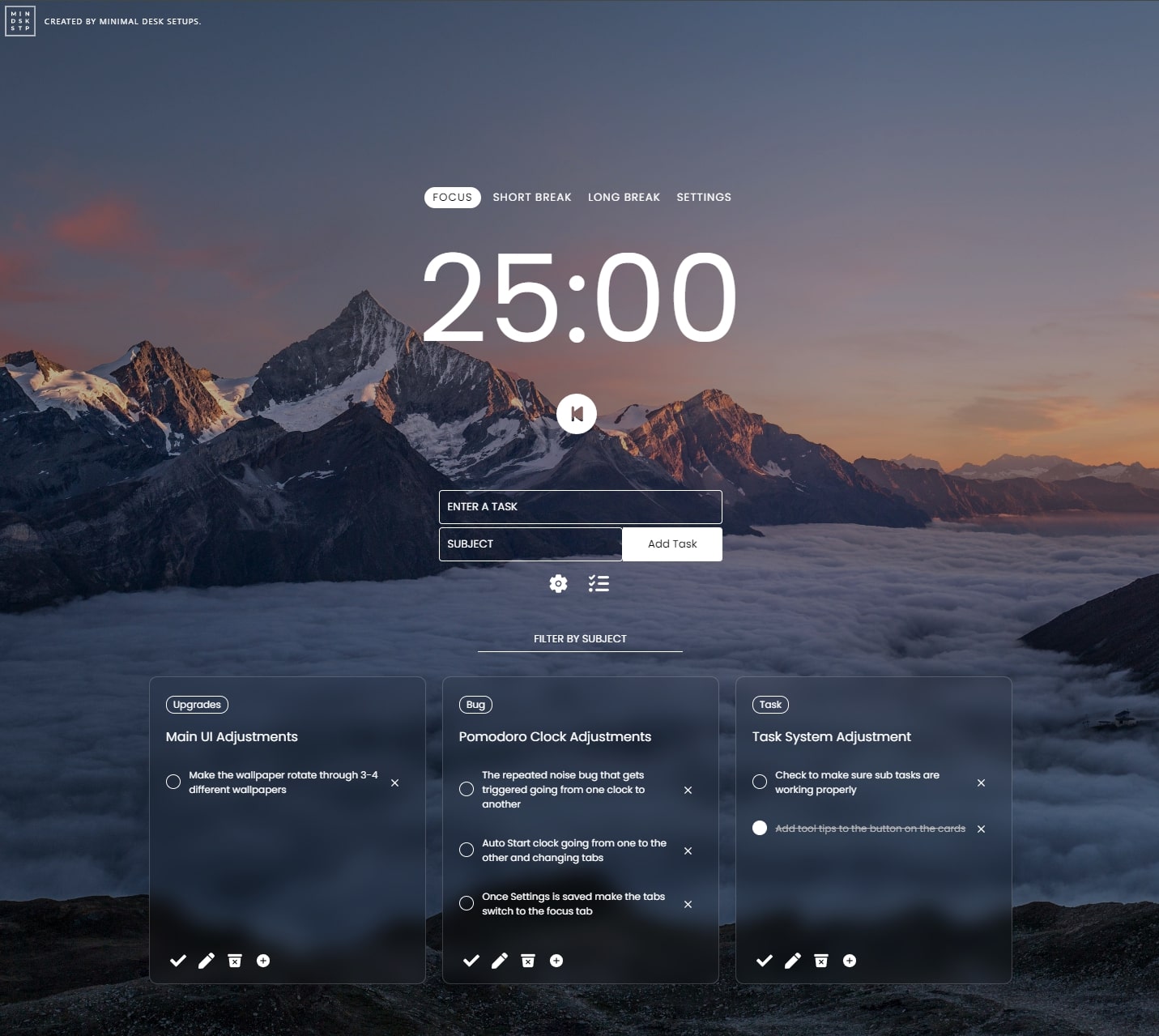
Focus by MDS is a productivity app I built and is currently distributed on the Chrome Web Store. I’ve always wanted to build a productivity app because there hasn’t been a single app that fits my needs. I wanted something simple but functional that didn’t require registration. There were also a number of missing features. Finally, I decided to build my own to share with you all.
Productivity is a major key for anyone who wants to be successful. It’s not about how much is done, but the importance of the work being done, that’s why if you have productive habits you can produce more important work in a shorter period of time. This Chrome extension is intended to help you direct your “focus” and produce important work in less time.
In short, this Chrome extension for productivity combines the features of task management (to-do list), time management (Pomodoro Timer) and beautiful background images and puts them in front of you – helping you develop a habit of using these productivity methods.
See “Focus” in the Chrome Web Store (Free)
Important features
Work Management: Organize and Prioritize Easily
At the heart of ‘Focus by MDS’ is its intuitive task management feature. It is designed to simplify the way you organize your daily activities. Whether it’s work-related tasks, personal tasks, or long-term projects, the extension lets you list them all in a clean, easy-to-navigate interface.
A Simple To-Do List: The beauty of this feature is its simplicity. You can add, edit, and delete jobs with just a few clicks. Drag-and-drop functionality allows you to rearrange tasks based on priority, helping you focus on what’s most important without getting overwhelmed.

Sub-task: One of the outstanding features of ‘Focus by MDS’ is its ability to add sub-tasks to your main task. This functionality allows for a more granular approach to task management, breaking down large, complex tasks into smaller, manageable parts. For example, if you have a main task like ‘Organize Office’, you can create sub-tasks like ‘Sort Files’, ‘Label Drawers’, and ‘Organize Books’. Not only does this lighten your load but it also provides a clear roadmap to complete, making it easy to track progress and stay organized. By providing a phased view of tasks, ‘Focus by MDS’ ensures that every detail of your project is captured and nothing is overlooked, improving overall productivity and efficiency.
Job Planning and Sorting: you can divide tasks into different lists or projects. This division not only brings clarity to your workflow but also helps in tracking progress in different areas of your life or work.
Time Management: The Pomodoro Technique
‘Focus by MDS’ incorporates the famous Pomodoro Technique to improve your concentration and productivity. For those unfamiliar, the Pomodoro Technique involves working out for fixed periods of time, usually 25 minutes, followed by a short break. This method has been proven to reduce fatigue and maintain high levels of concentration throughout the day.

Our Chrome extension includes a customizable Pomodoro timer. You can adjust the activity and cut the length to suit your rhythm. Whether you prefer 25-minute workouts or longer intervals, ‘Focus by MDS’ suits your style.

During these focused sessions, the extension minimizes distractions by keeping your to-do list and timer front and center. This subtle nudge keeps you aligned with your tasks, promoting a disciplined approach to work.
Beautiful Wallpapers: Beauty and Inspiration for Every Tab
We understand that the workplace has a significant impact on productivity. ‘Focus by MDS’ brings a unique touch of beauty to your digital workspace with beautiful, high-resolution wallpapers that greet you on every new tab.
These wallpapers are carefully selected to inspire and uplift. From peaceful landscapes to minimalist designs, each wallpaper is chosen to create a calm and focused work environment.
The visual appeal of these wallpapers not only enhances the look of your workspace but also contributes to reducing stress and creativity. With ‘Focus by MDS’, each new tab is a new opportunity for visual stimulation and concentration.

I intend to add new wallpapers every season – There will be a fixed set of wallpapers and then a set of wallpapers that cycle in and out depending on popularity. In addition, I want to try my best to make a function where the user can upload their wallpapers from Unsplash.com and I will use them.
Improving Your Workflow with ‘Focus by MDS’
Not just a Work Management System
I designed ‘Focus by MDS’ to be more than just a practice app. The idea is that you can also use it as a note taking app. If you have things to take notes on – just put the title in ‘Notes‘: then write the title of the note as a subject and use the sub-task system to write important sections of notes. It can be used in a variety of ways such as:
- Writing down the main ideas you might have
- Writing down scenes and shooting list ideas you have
- Any creative ideas
- Places to go
- Things to investigate
Why is the to-do list system structured like cards?
The reason I designed the to-do list items as cards is because I want to be able to use a future feature where you can hide these cards and bring them out when you need them again. I find that the cards are easy to create ideas on. The cards are designed so they can be moved around like a Kanban board – but they can also be used to organize storyboard ideas and you can move them around in a chronological order. This is for a portable system that I used to write an essay about my ideas.

Why are wallpapers important?
Every time you open a new tab, ‘Focus by MDS’ greets you with a beautiful wallpaper. These images are not just for beauty; they have been chosen to create an inspiring and motivating environment. I designed this background feature simply because many people didn’t know where to find the best wallpapers. Starting Small Desktop Setup made me realize that there was a whole market for “unique or invisible” wallpapers that people paid money for. The truth is that most people don’t know that you can go to places like Unsplash and find amazing landscape wallpapers. The keyword you are looking for is important. In the app, I used the keyword ‘mountain’.
So change the wallpapers according to your mood. A quiet, calm image may be suitable for more focused work, while something bright and vibrant may be good for chat sessions.
Practical Tips for Using ‘Focus by MDS’
Start your day by reviewing and revising your to-do list. It’s a simple habit that can set the tone for a productive day.
Use the Pomodoro timer for tasks that require deep concentration. It works best for challenging or difficult tasks that may lead to procrastination.
During a Pomodoro break, step away from your desk. Take a moment to stretch, hydrate, or simply rest your eyes. These breaks are important for maintaining long-term productivity.
Future Features: Expanding the Horizons of ‘Focus by MDS’
As I continue to develop and improve ‘Focus by MDS’, I am excited to share a sneak peek at some of the new features I plan to implement in the near future. My goal remains the same: to provide you with the best tools to improve your productivity and make your daily commute as seamless as possible. Here are some of the planned features:
1/ Active Time Block Time Grid
In our upcoming updates, we will introduce a time grid feature that changes the way you organize your day. This time grid will allow effective time blocking, a proven method to increase productivity by setting specific time slots for activities or tasks. It is inspired by our work and schedule.
What makes this feature even more powerful is its ability to sync with your Google or Outlook calendar. This means that your daily events, meetings, and appointments will be automatically integrated into a time grid, giving you a comprehensive view of your day at a glance.
With this integration, you can easily organize your existing commitments, ensuring that every minute of your day is fully utilized. Whether it’s carving out focused work times or scheduling time off, a time grid will help you maintain a balanced and productive schedule.

2/ Easy Access to Beautiful Wallpapers
I understand the impact good visuals can have on your mood and productivity. That’s why I’m working to make it even easier for you to access and enjoy a wide variety of amazing wallpapers.
In the future, ‘Focus by MDS’ will feature improved integration with Unsplash, giving you a more direct way to choose from thousands of high-quality, inspiring images. With just a few clicks, you can personalize your workspace with a wallpaper that matches your style and preferences.
This update aims not only to diversify your visual options but also to simplify the process of finding that perfect background for your workday.
Feedback or Feature Requests
If you have feedback you can provide any features you think would be a good fit. Feel free to post them here.
I will be updating this page regularly and will include a change log of what has been fixed and what has been added.
See “Focus” in the Chrome Web Store (Free)
I hope you all had a good time using this tool.
– Sam T.